How to Use IW Retirement Planner
IW Retirement Planner streamlines retirement planning by bringing together two widely-used methods: straight-line forecasting, which projects future financial needs, and industry-standard Monte Carlo stress testing, which evaluates risk by simulating different market conditions. This approach combines the strengths of both techniques, offering a powerful, free tool that helps you feel confident in your plan and the decisions you make.
 Gather Your Finances and Expenses
Before you begin, you need to gather your financial information. This includes your current savings and investments.
You will also need to factor in an estimate of your expenses during retirement. You can use IW Retirement Planner's built-in Retirement Expenses Estimator tool or create a detailed estimate using Vanguard's Retirement Expenses Worksheet. Alternatively, you can estimate your retirement expenses with Morningstar's 7-step method or Fidelity's rule of thumb method.
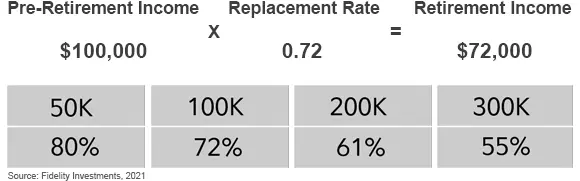 Rule of thumb to roughly estimate your retirement income needs
 Run a Straight-Line Forecast
Straight-line forecasting assumes consistent year-to-year investment growth, from the beginning to the end of retirement. This forecasting approach helps determine the funds needed to sustain a comfortable retirement lifestyle and evaluate the necessary contributions to achieve your desired goals.
Please review the following sections to gain an understanding of how best to use IW Retirement Planner when creating your retirement plan.
IW Retirement Planner supports both fixed and flexible spending options. The right choice between these approaches depends on your financial circumstances, risk tolerance, and personal preference. Each strategy has its pros and cons, so it's important to select the one that aligns best with your needs and goals.
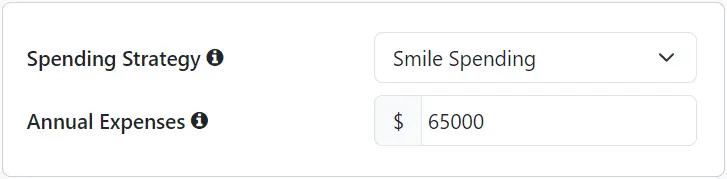 Choose your Spending Strategy
Fixed spending withdraws a set, inflation adjusted, amount each year, offering a predictable and stable income that simplifies budgeting for essentials. While this approach provides simplicity, it may not account for lifestyle changes or needs at various stages of retirement. Use one of the methods from Step 1 to estimate the income you will need to maintain a comfortable retirement.
IW Retirement Planner applies a 1% annual reduction to Fixed spending expenses, based on research from The Center for Retirement Research. You can modify this reduction amount in Assumptions.
Smile spending is an age-based approach to retirement spending, grounded in research showing that retirees often spend more in the early and late stages of retirement and less during the middle years. This method helps align spending with the evolving lifestyle and needs of a typical retiree. Use one of the methods outlined in Step 1 to estimate your initial expenses.
Dynamic spending provides the most flexibility by adjusting spending levels based on market performance and portfolio health. It is best suited for retirees who are willing to reduce expenses during lean market years in exchange for the ability to spend more initially and during favorable market years. This approach also helps mitigate the risk of outliving assets by adapting spending in response to changing economic conditions.
Dynamic spending starts with a withdrawal of 5% of your total investment portfolio. Each subsequent year adjusts the prior year's spending for inflation and then applies guardrails of 4% and 6%. If the withdrawal amount falls below the lower guardrail, it is increased to it. Conversely, if the withdrawal amount exceeds the upper guardrail, it is capped there. The starting withdrawal and both guardrails default to 5%, 4%, and 6%, and can be changed when Dynamic spending is selected.
Actual portfolio withdrawals may be offset by non-investment income such as employment, pension, passive income, and Social Security.
All spending strategies are indexed to inflation. See FAQ for additional information.
Investment Income Buckets
Readily available funds, including Savings, CDs, Money Market, and Treasury Bills. You can set a maximum value for this bucket using the Invest Excess Cash field. Any amount above this limit is automatically invested in Taxable Investments at year-end.
Includes stocks, bonds, and mutual funds held outside retirement accounts. You can specify the bond allocation and cost basis (the purchase price of investments).
Retirement accounts that allow you to defer federal income taxes until funds are withdrawn. Common examples include 401(k), 403(b), 457(b), IRA, SEP, and SIMPLE IRA accounts. You can specify the bond allocation for this bucket.
 Tax-Deferred Income Bucket
Retirement accounts where taxes are paid on contributions up front, so future growth and withdrawals are generally tax-free. You can specify the bond allocation for this bucket. If your 401(k), 403(b), 457(b), IRA, or SIMPLE IRA includes a Roth component, include that amount in this bucket.
Funds held within a Health Savings Account that can be used for qualified medical expenses. Investment growth in an HSA is tax-deferred, and withdrawals for eligible healthcare costs are tax-free. You can specify the bond allocation for this bucket to reflect how HSA assets are invested over time.
The retirement planner prioritizes HSA funds for medical expenses but will use them for general expenses if no other funds are available.
Cash & Equivalents and Taxable Investment buckets are shared between spouses, if applicable. Review the return assumptions for your investment buckets. Equity growth rate, dividend yield, and bond yield can be customized in Assumptions.
Non-Investment Income Buckets
A federal program providing monthly retirement income based on your earnings history. Enter your estimated monthly pre-tax benefit at Full Retirement Age (in today's dollars) and the intended starting date. Refer to the FAQ for guidance on getting the most accurate FRA benefits estimate on SSA.gov. Spousal and survivor benefits are estimated automatically when applicable.
If you are already receiving Social Security benefits, enter your current before-tax benefit amount and the date your benefits began.
 Social Security Income Bucket
IncomeWize does not currently support custom spousal-benefit start dates for spouses with no work credits. The planner automatically starts spousal benefits at the earliest eligible date. See the FAQ Spousal Benefits section for details.
Provide a fixed monthly retirement income, typically funded by a former employer. Enter your expected pre-tax benefit starting amount and the percentage payable to a surviving spouse, if applicable. For pensions with cost-of-living adjustments (COLAs), enable automatic increases by setting the COLA rate in Assumptions. Lump sum distributions should be entered in Other Income.
If you are already receiving pension benefits, enter your current before-tax benefit amount and select Already Receiving for the starting date.
Includes recurring, non-earned income such as rental income, royalties, partnership (K-1) income, and non-qualified dividends. Enter your expected monthly pre-tax benefit, the ending date (or select Lifetime), and the percentage payable to a surviving spouse, if applicable. If your income increases annually, you can adjust the growth rate under Assumptions. All passive income is taxed as ordinary income.
If you are already receiving passive income, enter your current before-tax income amount and select Already Receiving for the starting date.
Post-retirement work, either part-time or during a staggered retirement gap.
Employment buckets cover only the years from your retirement date onward — for couples, the earlier of the two. Earnings before then aren't entered as income; instead, enter what you expect to save each year in Extra Savings.
Part-time EmploymentPart-time work can be included to supplement retirement income or to explore early retirement options. Enter your expected annual pre-tax income, annual raise, and employment starting and ending dates.
If you or your spouse are already retired and working part time, enter the current annual income and select Already Employed for the starting date.
Gap EmploymentA gap arises when you and your spouse retire in different years. The planner offers to add an Employment bucket for the income the still-working spouse earns during that period, and it updates automatically if either retirement date changes.
Income bucket savings automatically grow each year during your pre-retirement phase. You can also boost your savings by selecting the Extra Savings option to make additional contributions. Enter the after-tax amount you plan to set aside.
Extra ExpensesIn addition to your regular monthly expenses, you may have other one-time or recurring needs, such as paying off debt, taking a family vacation, or contributing to a child’s education or wedding. To include these, click the Extra Expenses button and enter any additional post-retirement expenses into your plan. Do not include Healthcare-related expenses in this section. Please use the Healthcare Costs estimator to account for medical expenses.
Other IncomeBeyond your income buckets, you can include one-time or recurring income events such as an inheritance, lump-sum pension distributions, or royalties. To add these, click the Other Income button and enter both pre- and post-retirement income amounts. The values should reflect after-tax amounts and are not adjusted for inflation.
Healthcare expenses are likely to be among your most significant costs in retirement. Estimating these expenses is typically divided into two phases: pre-Medicare (before age 65) and Medicare (age 65 and beyond), as each involves different planning considerations.
IW Retirement Planner allows you to automatically estimate premiums for Medicare Part A (Hospital Insurance), Part B (Medical Insurance), and Part D (Prescription Drug Coverage), along with any applicable Income-Related Monthly Adjustment Amount (IRMAA) surcharges, in your annual expense projections.
You can include out-of-pocket costs such as deductibles, copays, and optional coverage including Medigap, dental, and vision. For help estimating these costs, refer to Chapter Medicare's The Complete Guide to Medicare Out-of-Pocket Costs.
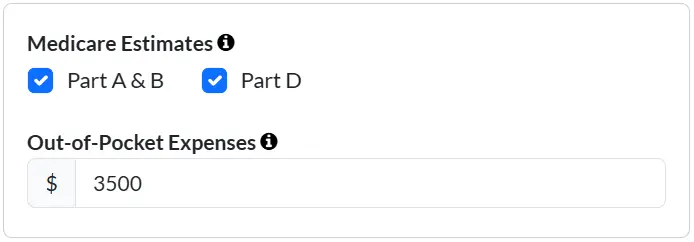 Estimating Medicare premiums and out-of-pocket expenses
Estimated pre-Medicare expenses can be included in your plan. They apply from each person's retirement date until they turn 65, when Medicare begins. For help estimating these costs, you may refer to the Kaiser Family Foundation's Health Insurance Marketplace Calculator, which accounts for subsidies, or Vanguard's Health Care Cost Estimator.
The U.S. Administration for Community Living estimates that a 65-year-old today has approximately a 70% chance of needing some form of long-term care in the future. You can add estimated long-term care costs for the final two years before longevity age. Tools like the Genworth Cost of Care Survey and Vanguard’s Health Care Cost Estimator can help forecast these expenses.
Click the Healthcare button to include healthcare expenses into your planning. All healthcare costs are adjusted annually based on the Healthcare Inflation rate specified in Assumptions.
The Social Security Maximizer feature simplifies decision-making by determining your optimal Social Security filing strategy. It evaluates more than 700 filing strategies to identify the one that maximizes lifetime benefits within your retirement plan.
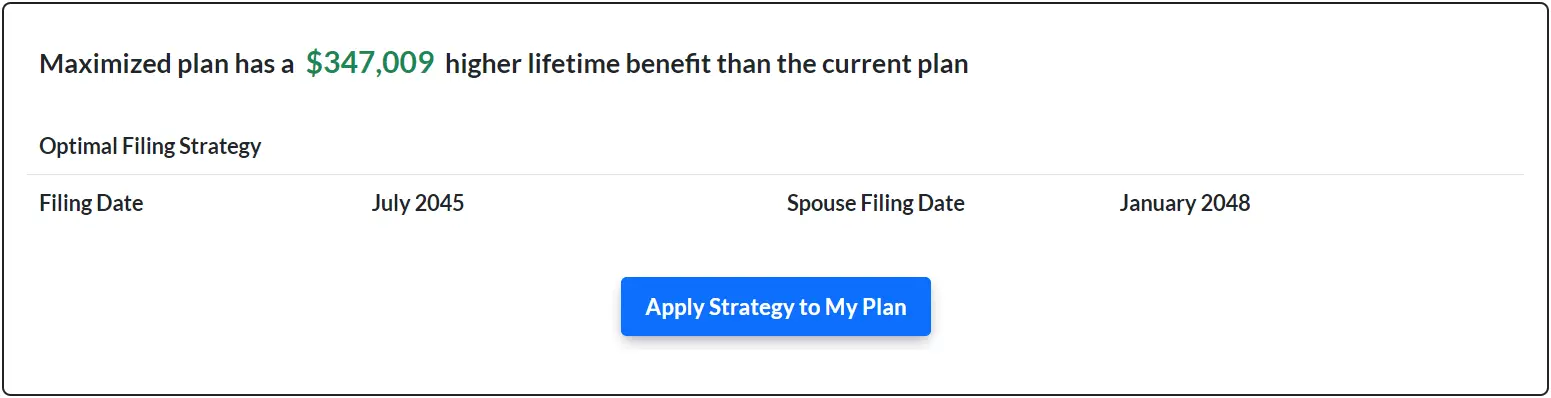 Quickly find the Social Security filing strategy that maximizes lifetime benefits
This powerful tool takes into account retirement, spousal, and survivor benefits, and incorporates key benefits rules including early benefit reductions, delayed retirement credits, earnings test adjustments, RIB LIM, and restricted application and deeming rules.
Simply activate the Social Security Maximizer switch and run an analysis of your Social Security filing options. The results of the analysis can be reviewed through interactive charts, along with an estimate of the additional benefits you may be eligible for. The optimized strategy can then be applied directly to your retirement plan.
IW Retirement Planner provides three different ways to experiment with the most effective way to lower taxes for your situation. Explore the Withdrawal Strategy, Roth Conversion, or Tax Minimizer features to test your plan and potentially save thousands in taxes.
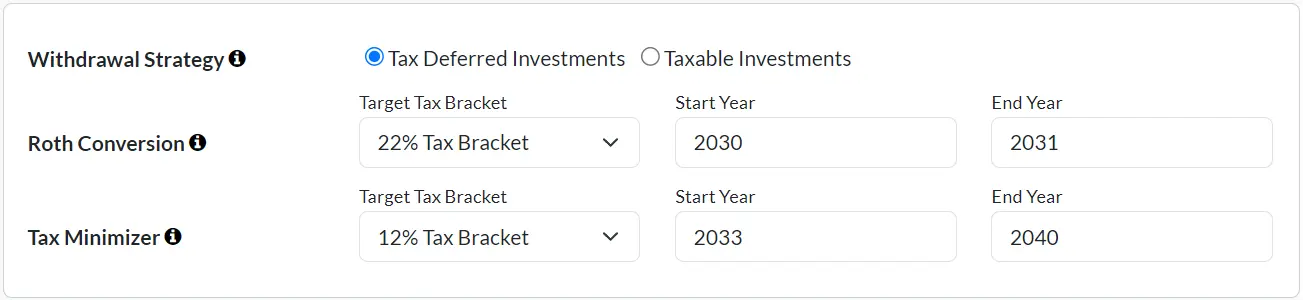 Choose from three tax optimization strategies
Allows you to choose which bucket to withdraw income from first, Taxable or Tax-Deferred Investments.
For example, selecting Tax-Deferred Investments may be beneficial if 401(k)s and Traditional IRAs make up a large portion of your savings, as this can help reduce the tax impact of Required Minimum Distributions later in retirement.Allows you to convert Tax-Deferred Investment funds into Tax-Free Investments, up to a chosen federal income tax bracket. The ideal times to consider Roth conversions are usually during lower tax years, typically after retirement, but before starting Social Security or Required Minimum Distributions (RMDs).
Converted funds are taxed as ordinary income but offer tax-free growth, help reduce the long-term tax impact of Required Minimum Distributions, and provide tax-free income later in retirement.Attempts to lower taxes to a specified federal income tax bracket by replacing Tax-Deferred Investment withdrawals, which are taxed as ordinary income, with Tax-Free Investments, or Taxable Investments which are taxed as long-term capital gains.
The goal is to replace just enough ordinary income to remain within the chosen bracket and avoid pushing income into higher tax tiers. This feature is typically most effective for those who are not at risk of large RMDs later in retirement. Run an AI-Enabled Stress Test
Straight-line projections assume a steady average return, like 6% annually, without accounting for the market’s natural ups and downs. In reality, returns vary annually, and the sequence of those returns, especially early in retirement, can significantly affect how long a portfolio lasts.
IW Retirement Planner addresses this risk through advanced stress testing, powered by Monte Carlo simulations and AI trained on over 55 years of historical market data. Each stress test generates 1,000 unique retirement scenarios that reflect more realistic market volatility, incorporating fluctuations in investment returns, inflation, and other risks, including severe market downturns. The result is a more rigorous evaluation of whether your plan can adapt to uncertainty while still supporting your retirement income goals.
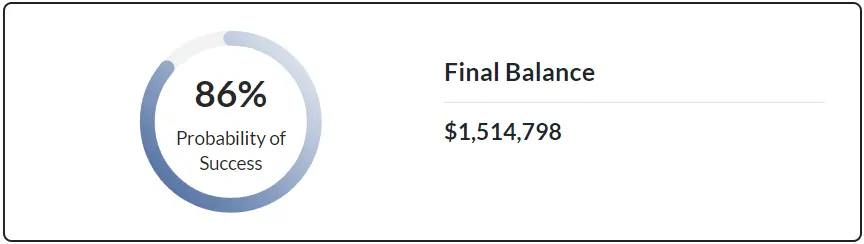 Monte Carlo stress test Probability of Success score
To perform a Monte Carlo stress test, simply activate the AI-Enabled Stress Test switch and run a simulation to evaluate the risk level of your straight-line plan. Results can be reviewed through interactive charts and a summary that includes your plan's Probability of Success score, representing the percentage of scenarios where your funds lasted throughout your full retirement.
A Monte Carlo probability of success is a planning indicator, not a prediction or pass/fail score. For example, an 80% probability means that approximately 80% of the simulated scenarios successfully funded the plan through the end of the modeled retirement period.
A higher probability generally means the plan has more cushion against unfavorable market outcomes, but higher is not always better. An extremely high probability may indicate that the plan is more conservative than necessary, potentially resulting in lower spending, a later retirement, or significantly more assets remaining than intended.
There is no single probability that is right for everyone. The result is also highly dependent on the assumptions used, including spending, retirement age, investment returns, asset allocation, and retirement length.
Use your probability of success as a way to understand risk, compare scenarios, and identify potential adjustments rather than as a prediction of whether your retirement will actually succeed or fail.
Learn more: Goldilocks and the "Just Right" Probability of Retirement-Planning Success
 Adjust Your Financial Plan
Based on your retirement planning results, you may need to make adjustments. If the analysis shows a risk of running out of money, you might consider increasing savings, reducing expenses, adjusting your retirement date, or refining your investment approach. If the analysis shows you are likely to have more than enough funds, you may have options such as retiring earlier, leaving a larger inheritance, increasing travel, or expanding other retirement goals.
It can also be helpful to review the assumptions used in your plan. Default equity, bond, and dividend growth rates are based on long-term historical averages, but future returns may be lower. Reducing return assumptions, such as lowering the equity growth rate by 1% to 2%, can create a more conservative forecast and help build a margin of safety.
What-If ExplorerThe What-If Explorer lets you test different plan options and compare them against your current plan. You can explore changes such as investment assumptions, Roth conversions, healthcare costs, Social Security claiming age, retirement year, expenses, and more.
This can help you evaluate which adjustments may improve your overall retirement outlook, reduce risk, or better align the plan with your goals. Results are shown side by side, making it easier to compare projected balances, expenses, taxes, withdrawal rates, and overall plan outcomes.
 Track Your Progress
It is essential to regularly review and adjust your retirement plan based on changes in your financial situation, market conditions, and life circumstances.
You can save your retirement plan at any time by clicking the Save Session button. This generates a unique link to your plan, which you can bookmark for easy access. Use this bookmark to revisit, update, and monitor your plan from any device, anytime. Be sure to save and update your bookmark each time you make changes to your plan.
This same bookmark is also how you connect your plan to your own AI assistant, read-only and free. See AI Access to learn more.
Monitor Different ScenariosThe Save Session feature also allows you to save and track multiple planning scenarios. This includes conservative or optimistic investment growth assumptions, as well as unexpected major events, helping you understand their impact on your retirement goals.